Your AI trip planner for multi-city travel — five minutes, not five tabs.
Tripdox is the AI travel planner that turns a plain-English trip into flights, trains, hotels, and a day-by-day itinerary — built, optimized, and editable in one chat. Works worldwide, prices in your local currency.
Free forever · No credit card · No trial timer
Real-world data, not vibes
 Google Maps
 Booking.com
 OpenAI
 Gemini
See it in action
Watch Tripdox build a full trip
From a one-line prompt to a printable itinerary in 90 seconds.
How it works
Three steps from idea to itinerary
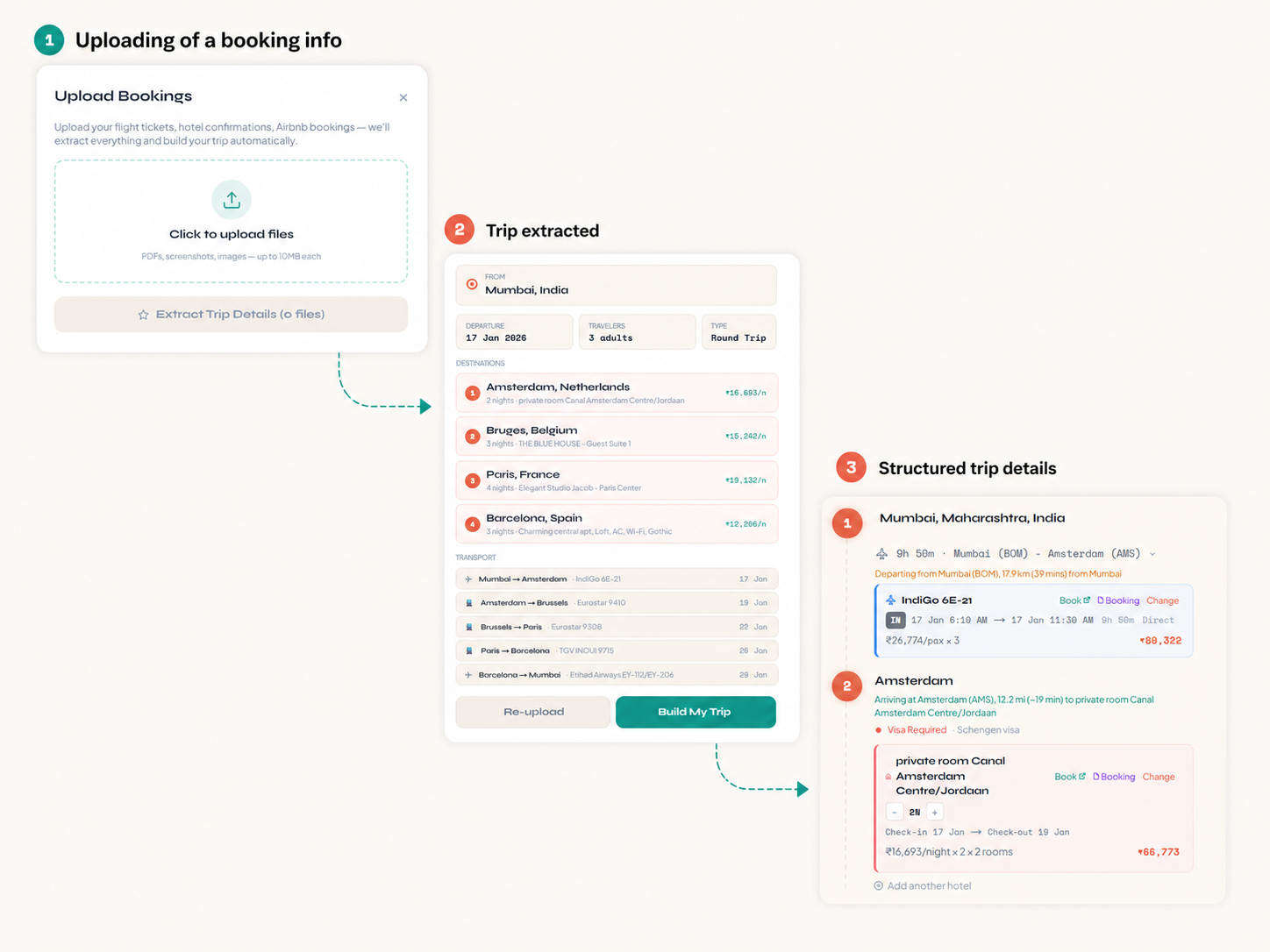
Tell it where you want to go
Add cities in any order, set nights per stop, pick travelers and dates. Or upload booking PDFs and they auto-populate.
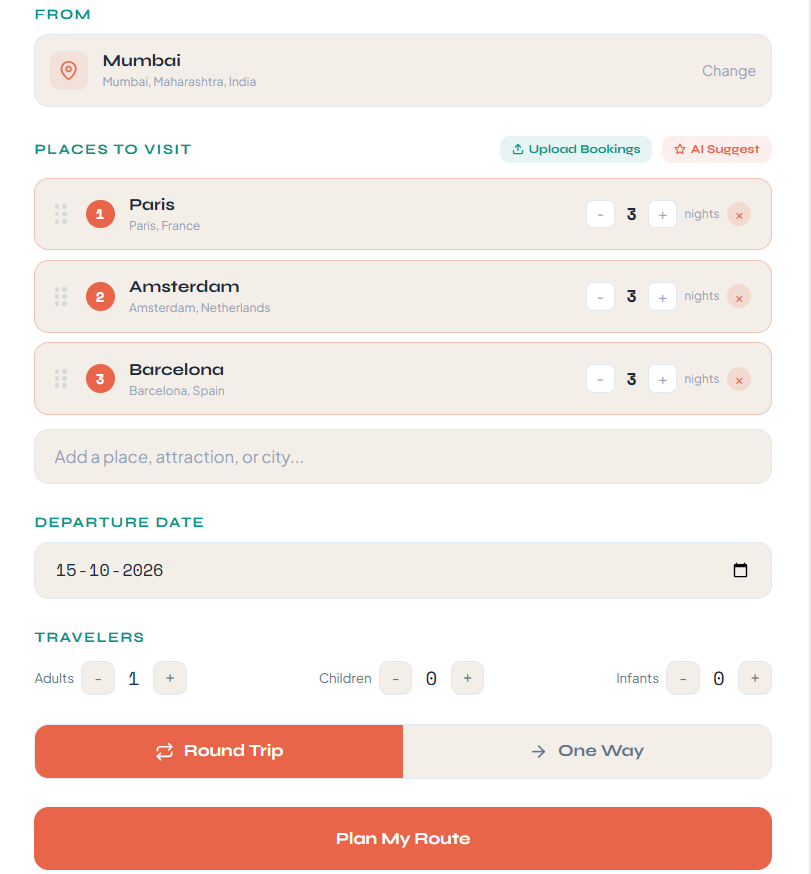
Get flights, trains and hotels
Flights and trains searched in parallel. Cheapest-and-fastest auto-selected per leg. Hotels suggested per city with live pricing and photos.
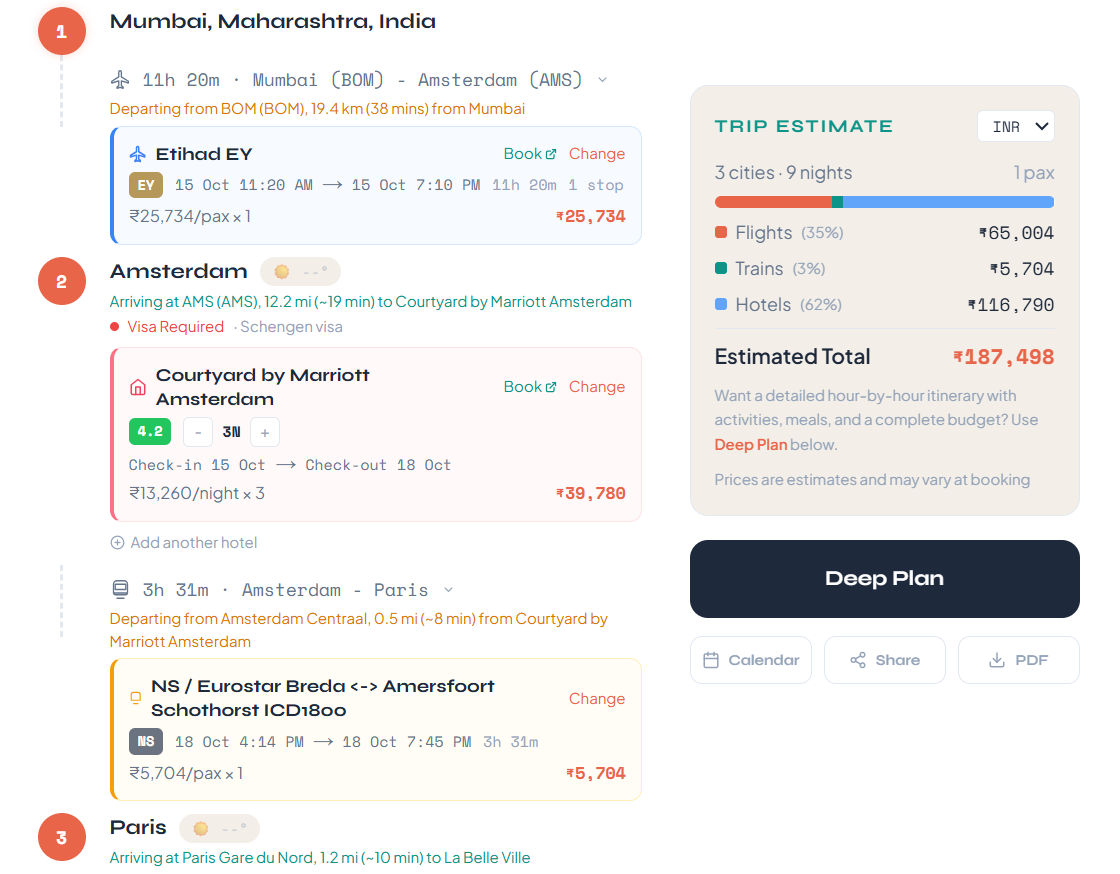
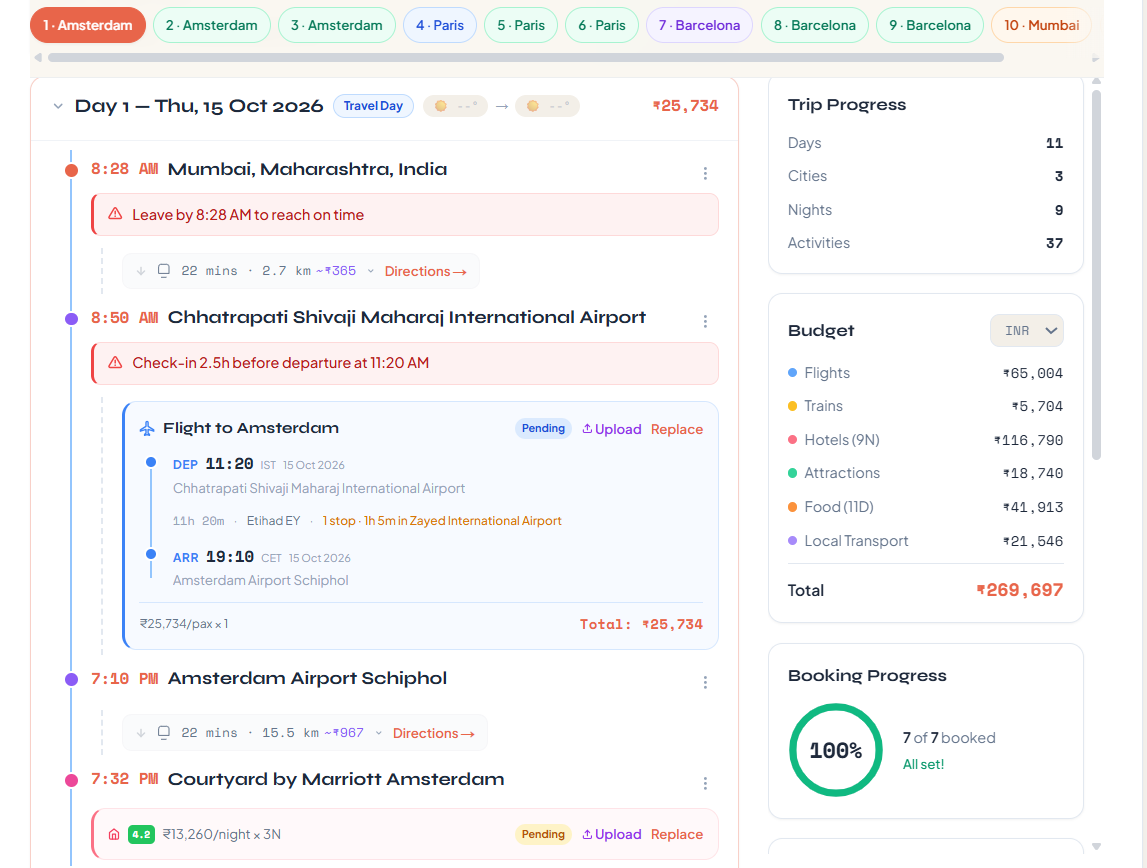
Get a day-by-day plan
Real activities with GPS, durations, opening times and ticket prices. Meals slotted in. Travel times between stops and walk/transit directions, all built in.
What you get
Everything a trip needs, handled
AI trip chat
Describe the trip in one sentence. The AI builds, edits, and refines it with you — no forms, no blank canvas.
Flights + trains in parallel
Both searched at once. The cheapest-and-fastest is auto-picked; swap modes per leg with one click.
Route optimization
Add cities in any order. They reorder into the shortest path so you spend less time in transit.
Upload booking docs
Drop in a PDF or photo of a confirmation — the AI extracts the flight, hotel, or train and slots it into the plan.
Plus shareable trip links, PDF export, and 10-currency display.
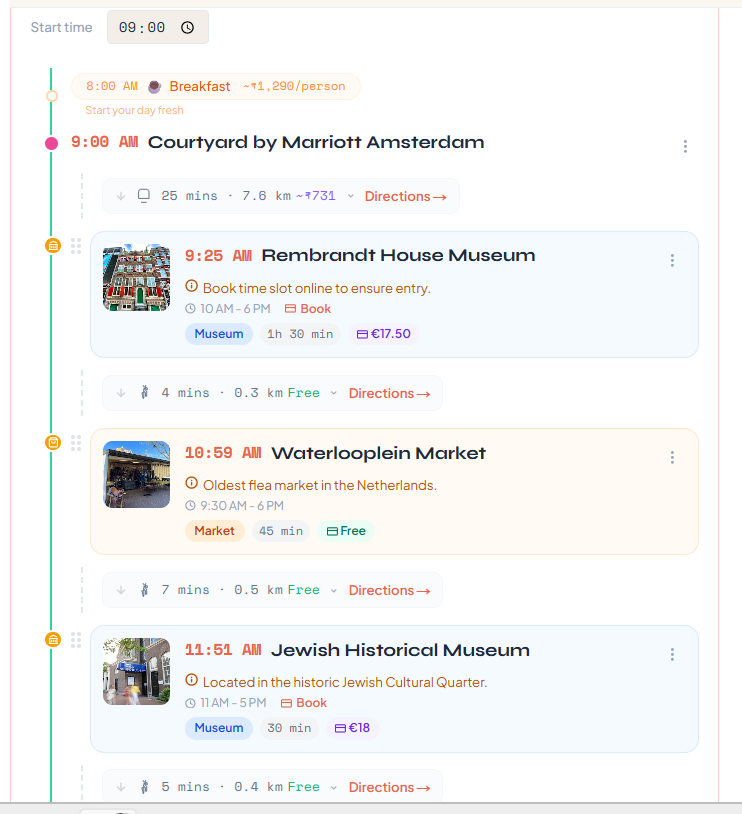
Down to the hour
Real timings, real walking distances, real ticket prices.
Each day plans to the minute: meal slots, museum opening hours, walk-versus-transit between stops, and ticket prices in the local currency. Drag to reorder, edit start times, or remove anything you don't want.
Why Tripdox
Not another travel notebook
Most AI trip planners stop at a list of suggestions. Tripdox actually searches, decides, and plans — so your trip goes from blank page to full itinerary in minutes.
| What you expect | Tripdox | Typical planner |
|---|---|---|
| Chat to build a full trip | Yes — one prompt, full plan | No — blank page or form |
| Search flights and trains together | Parallel, cheapest+fastest auto-picked | Link out to other sites |
| Reorder cities for shortest route | Automatic | Manual drag-and-drop |
| Upload booking PDF → populates trip | Yes — AI extracts details | No or partial |
| Day-by-day plan with timings + meals | AI-generated, editable | Empty template to fill |
Popular destinations
Or jump straight to a city
In-depth guides for our most-asked destinations — itineraries, budgets, fair prices, and emergency info.
Questions
Frequently asked
What is Tripdox?
Tripdox is an AI trip planner. Describe your trip in plain English — destinations, dates, number of travelers — and the AI builds the full plan: flights and trains, hotels per city, multi-city route optimization, and a day-by-day itinerary with real activities, meal slots, and directions.
Is Tripdox an AI travel planner?
Yes. Tripdox is an AI travel planner and AI trip planner in one — describe a trip in plain English and it plans flights, trains, hotels, multi-city routes, and a day-by-day itinerary automatically, worldwide and in your local currency.
Is Tripdox free?
Yes — Tripdox is free to use today. Get the app on Google Play, or sign up on the web with email or Google. No credit card, no trial timer.
How is Tripdox different from Wanderlog or TripIt?
Wanderlog is a collaborative notebook you fill in by hand. TripIt organizes confirmation emails from bookings you already made. Tripdox is different: describe a trip and the AI actually generates it — searching flights and trains in parallel, picking hotels, and building the day plan. See the full comparison at /vs/wanderlog and /vs/tripit.
Can Tripdox book flights and hotels for me?
Tripdox finds and recommends flights, trains, and hotels — actual booking happens on the provider site (Booking.com, airline site, etc.) via one-click links. You stay in control of payment and confirmation emails, and avoid being locked to a single booking partner.
How accurate are the AI-generated itineraries?
The itineraries use real activity data (GPS coordinates, durations, opening times from Google Places) layered with AI-generated day flow. Travel times between stops come from Google Directions, not estimates. Everything is editable — drag to reorder, delete what you don't want, edit start times.
How long does it take to plan a trip?
A full 10-day multi-city trip plan — flights, trains, hotels, daily activities — typically generates in 2–4 minutes of chat. Compare that to 5–10 hours of manual research, tab-switching between Skyscanner, Booking.com, and Google Maps.
Can I edit the AI's plan?
Yes — everything is editable. Reorder destinations, swap flights for trains, replace hotels, drag activities to different days, edit times, add your own places, delete anything you don't want. The AI gives you a starting point; you stay in control.
What destinations does Tripdox support?
Tripdox works for trips anywhere in the world — global flight and train inventory, Google's worldwide hotel and places data, and AI-generated activity plans for any named city. Prices display in your local currency (auto-detected, 10 currencies supported) and the /travel-guide section has in-depth city guides for top destinations.
More to ask? Email us.
Ready to plan smarter?
Build your next trip in a few sentences. No spreadsheets, no fifteen browser tabs.